There's a specific kind of Sunday afternoon frustration that anyone who cooks regularly will recognize: you've got five browser tabs open with recipes, a notes app with a half-written grocery list, and a vague memory that you already have oregano but not enough. It doesn't have to work this way.
Recipe-to-grocery-list apps exist specifically to collapse that chaos into a single workflow: save recipes, plan your week, generate your shopping list automatically. The problem is that not all of them actually deliver on that promise. Some are great at organizing recipes but weak on grocery lists. Some have fantastic meal calendars but lock you into their recipe database. A few are genuinely excellent. Most are fine.
This guide covers the main contenders — Kitchendary, Paprika, Mealime, Plan to Eat, BigOven, AnyList, OurGroceries, Samsung Food (formerly Whisk), Cozi, and Yummly — with real pricing (as of early 2026), honest assessments of where each app shines and where it doesn't, and a comparison table to help you make the call quickly.
If you're new to meal planning altogether, the meal planning for beginners guide is a good starting point before diving into the app comparison.

Quick comparison: recipe-to-grocery-list apps at a glance
Before the deep dives, here's the full picture. Pricing is approximate as of early 2026 — always check the app's current pricing page before subscribing.
| App | Free Plan | Price/mo | Recipe Import | Auto Grocery List | Meal Calendar | Collaboration | AI Features | Best For |
|---|---|---|---|---|---|---|---|---|
| Kitchendary ⭐ | Trial | Paid | URL + social + photo | Yes | Yes | Yes (real-time) | Full AI planning | Families, AI users |
| Paprika | No | $4.99 one-time (iOS) | URL only | Yes | Yes | Limited | None | Recipe collectors |
| Mealime | Yes (limited) | ~$5.99 (Pro) | Closed library only | Yes | Yes | Limited | Suggestions only | Weeknight cooking |
| Plan to Eat | 30-day trial | ~$6.25 | URL import | Yes | Yes (drag & drop) | Basic | None | Existing recipe libs |
| BigOven | Yes (200 recipes) | $2.99 | URL + scan | Yes (Pro) | Yes (Pro) | Basic | Minimal | Budget-conscious |
| AnyList | Yes (basic) | $0.83 (annual) | URL import | Yes | Yes | Yes (household) | None | Grocery-first users |
| OurGroceries | Yes (full) | Free | Basic only | Yes | No | Yes (real-time) | None | Shared lists only |
| Samsung Food | Yes | Free | URL import | Yes | Yes | Yes | Basic AI | Samsung device users |
Kitchendary: the AI-first option
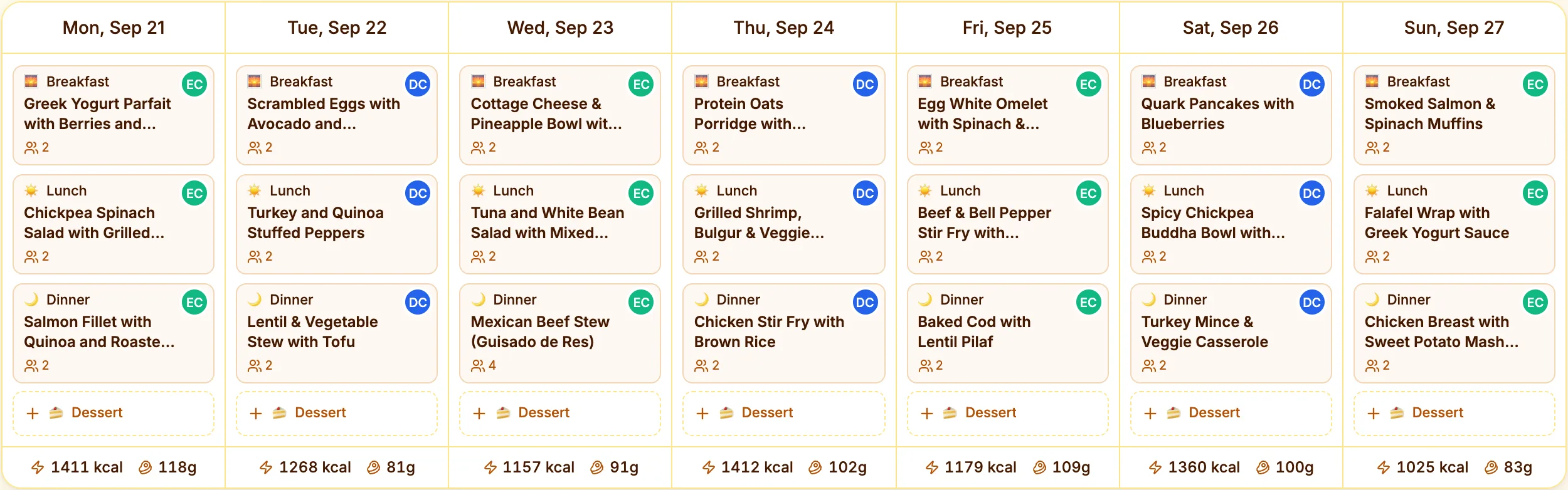
Kitchendary is the newest entrant in this space and also the most ambitious. The core pitch is that you shouldn't have to manually build a meal plan at all — the AI does it in about 60 seconds based on your dietary preferences, cuisine tastes, household size, and weekly schedule.
What sets it apart from every other app in this comparison is the recipe import. Most apps support URL-based import from major cooking websites. Kitchendary goes further: you can paste a URL, paste a link from Instagram or TikTok, paste the recipe text, or describe a dish and have the AI build a recipe from scratch.
The grocery list generation is the most automated here too. Once your meal plan is set — whether you built it manually or let the AI handle it — Kitchendary consolidates all ingredients, adds up duplicates across recipes, and groups the list by aisle. For families especially, the shared household is genuinely useful: everyone plans on the same calendar and sees the same list, and changes show up for the others straight away.
Where it falls short compared to legacy apps like Paprika: it doesn't have years of accumulated pantry and rating data, and the recipe library is smaller than BigOven's million-plus recipes. If you've been collecting recipes for a decade in another app, migration takes some effort. The subscription cost is also higher than the one-time-purchase model of Paprika.
That said, for anyone starting fresh or wanting genuine AI-driven planning, nothing else in this list comes close to the end-to-end automation. See also: the Kitchendary grocery list generator guide for a deeper walkthrough of the list features.
Paprika Recipe Manager: the serious collector's choice
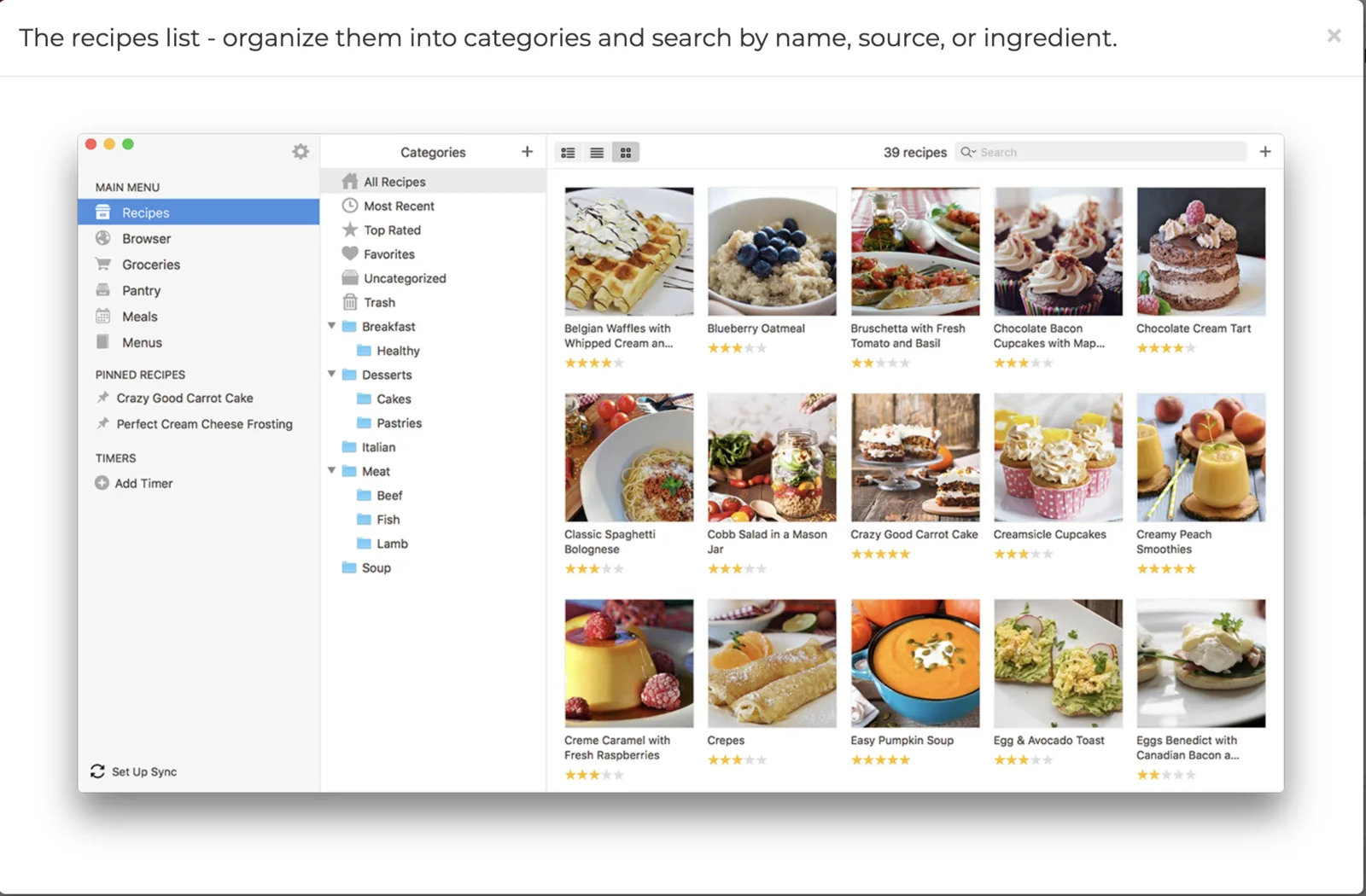
Paprika has been around since 2010 and has a devoted following for one reason: it's the best pure recipe organizer available. The in-app browser lets you clip recipes from any website, the pantry tracking is detailed, and the scaling and unit conversion tools work reliably. If you cook from a large personal recipe collection and want everything in one searchable, well-organized place, Paprika is genuinely excellent.
The grocery list generation is solid — it pulls ingredients from your planned recipes and sorts them sensibly — but it's not the most polished part of the app. Collaboration is limited. There's no AI-generated planning; you build your meal plan manually by dragging recipes into the calendar. None of that is a dealbreaker if organization is your primary goal.
The pricing model is worth understanding before you commit: Paprika sells separate versions for iOS, Android, Mac, and Windows. The iOS app runs around $4.99, Mac around $29.99, and so on. If you want it on three platforms, you're paying three times. There's no cloud sync subscription — that's included in the one-time purchase — but cross-platform ownership adds up. Kitchendary and most other modern apps cover all platforms under one subscription.
Bottom line: if you want a digital cookbook and you don't need AI planning or real-time collaboration, Paprika is one of the most polished apps in this space. If you want the grocery list workflow to be as automated as possible, you'll want something else. For a deeper comparison, see our broader best meal planning apps guide.
Mealime: fastest for weeknight meal planning
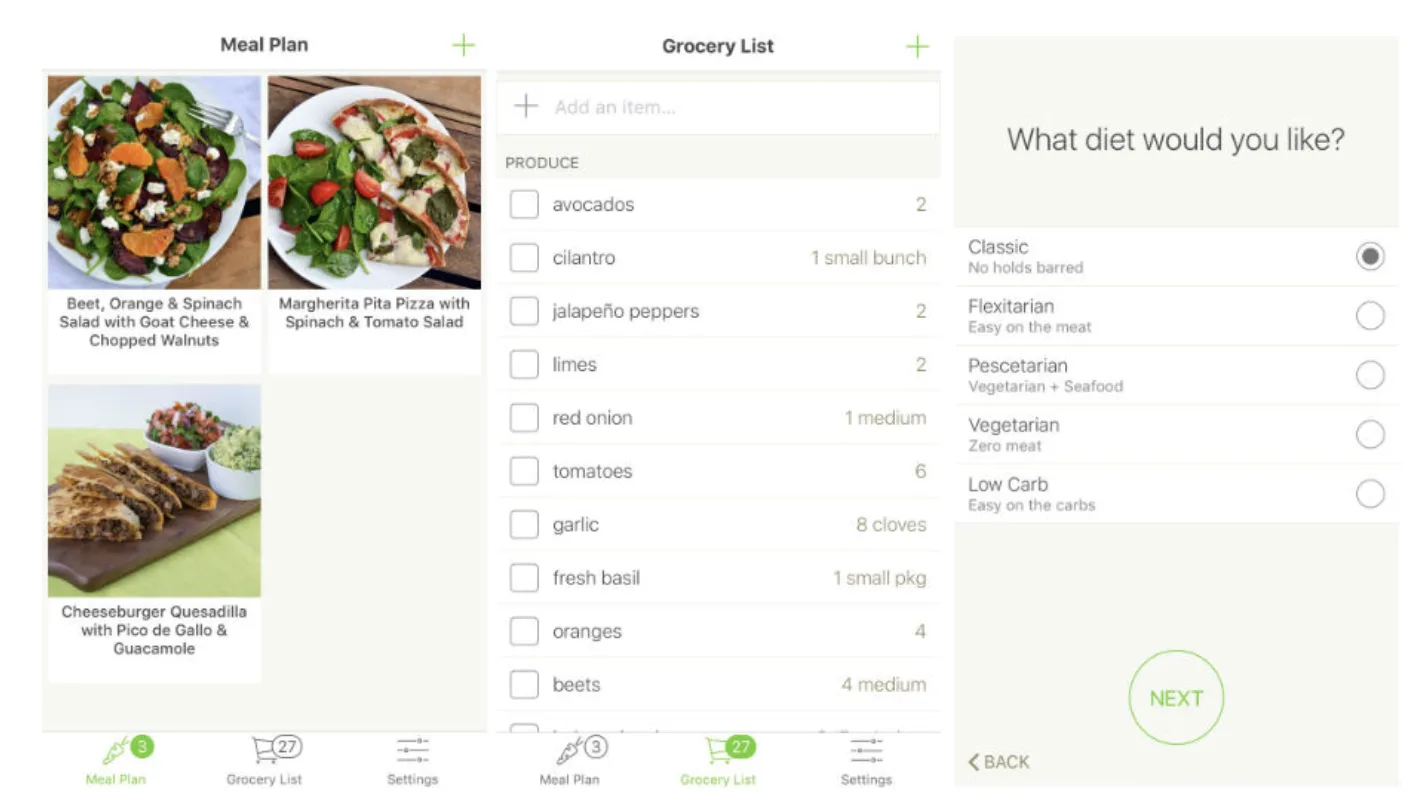
Mealime is the fastest path from "I need to plan dinner for the week" to "I have a grocery list." Open the app, answer a few questions about dietary preferences and serving sizes, and it generates a weekly plan with an organized shopping list in a matter of seconds. The recipes are 30 minutes or less, which is the whole point — this app is explicitly built for busy people who want simple, fast weeknight dinners.
The limitation is the closed recipe library. On the free plan, you're choosing from Mealime's curated recipe collection, not your own. You can't import a recipe from a website you love, save something from Instagram, or add a family recipe. Pro plan users get more recipes and some customization, but the constraint remains. If you have specific recipes you want to cook, Mealime will frustrate you. If you're happy to let the app pick from its library, it's genuinely efficient.
Mealime also has over 4.5 million users, which tells you it's doing something right. The grocery list quality is good — items are auto-categorized, duplicates are merged, and the layout is clean. Collaboration features are limited though; this is mostly a single-user or couple app rather than a family hub. At around $5.99/month for Pro, it's mid-range pricing for mid-range feature depth.
Plan to Eat: best for existing recipe collections
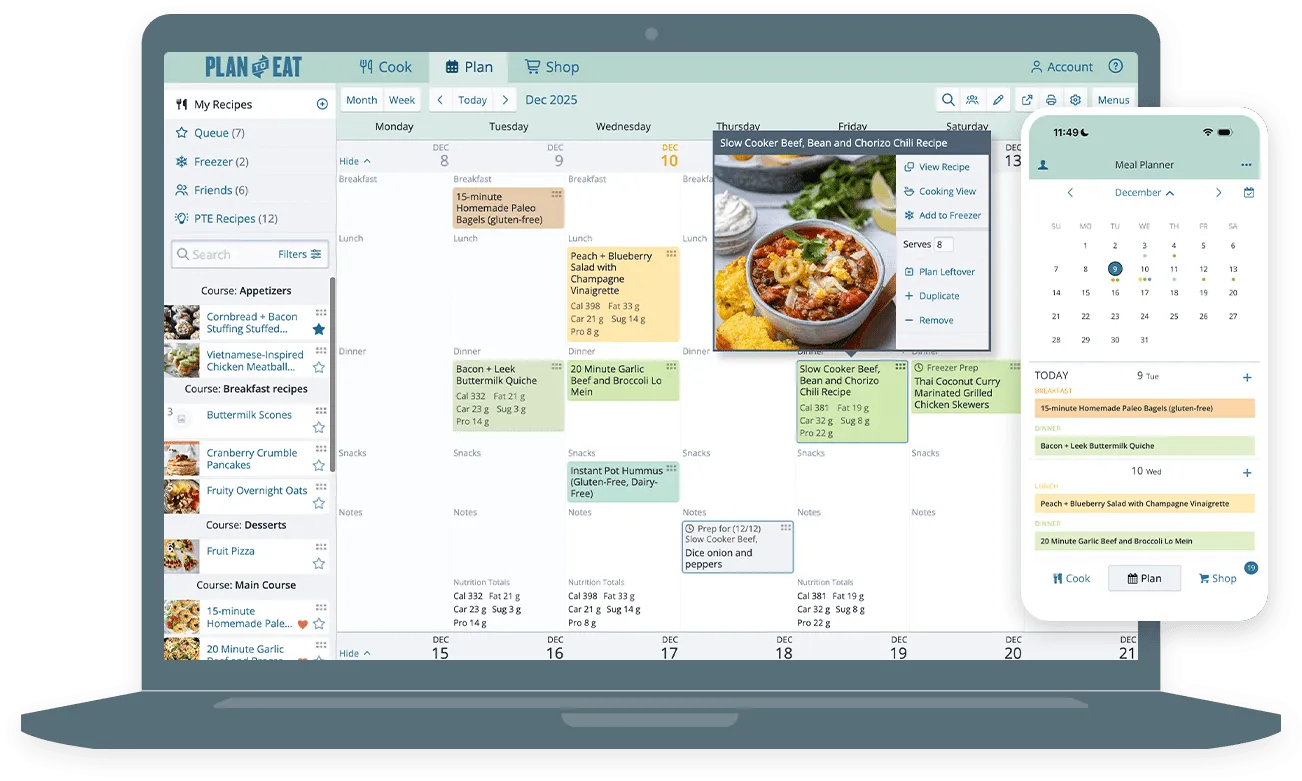
Plan to Eat has been around since 2009 and occupies a specific niche: families with established cooking habits who want a reliable, no-frills meal planner that respects their existing recipe collection. The URL recipe importer works well, the drag-and-drop meal calendar is satisfying to use, and the grocery list generation is reliable. Nothing flashy, just a well-built tool that does what it promises.
It's particularly popular with people who meal plan seriously and want a structured calendar view of the full week. The planner lets you reuse previous meal plans, which is useful if you rotate through a set of favorite weeks. The lack of AI features means planning is entirely manual — you're the one deciding what goes where. That's fine for experienced meal planners but might feel like extra work for anyone who wants recommendations.
Pricing is around $6.25/month billed annually, with a 30-day free trial. No permanent free tier. For a more detailed look, check the Plan to Eat guide. If budget is a concern, the how to save money on groceries guide covers strategies that work with any meal planning app.
BigOven: the budget-friendly database pick
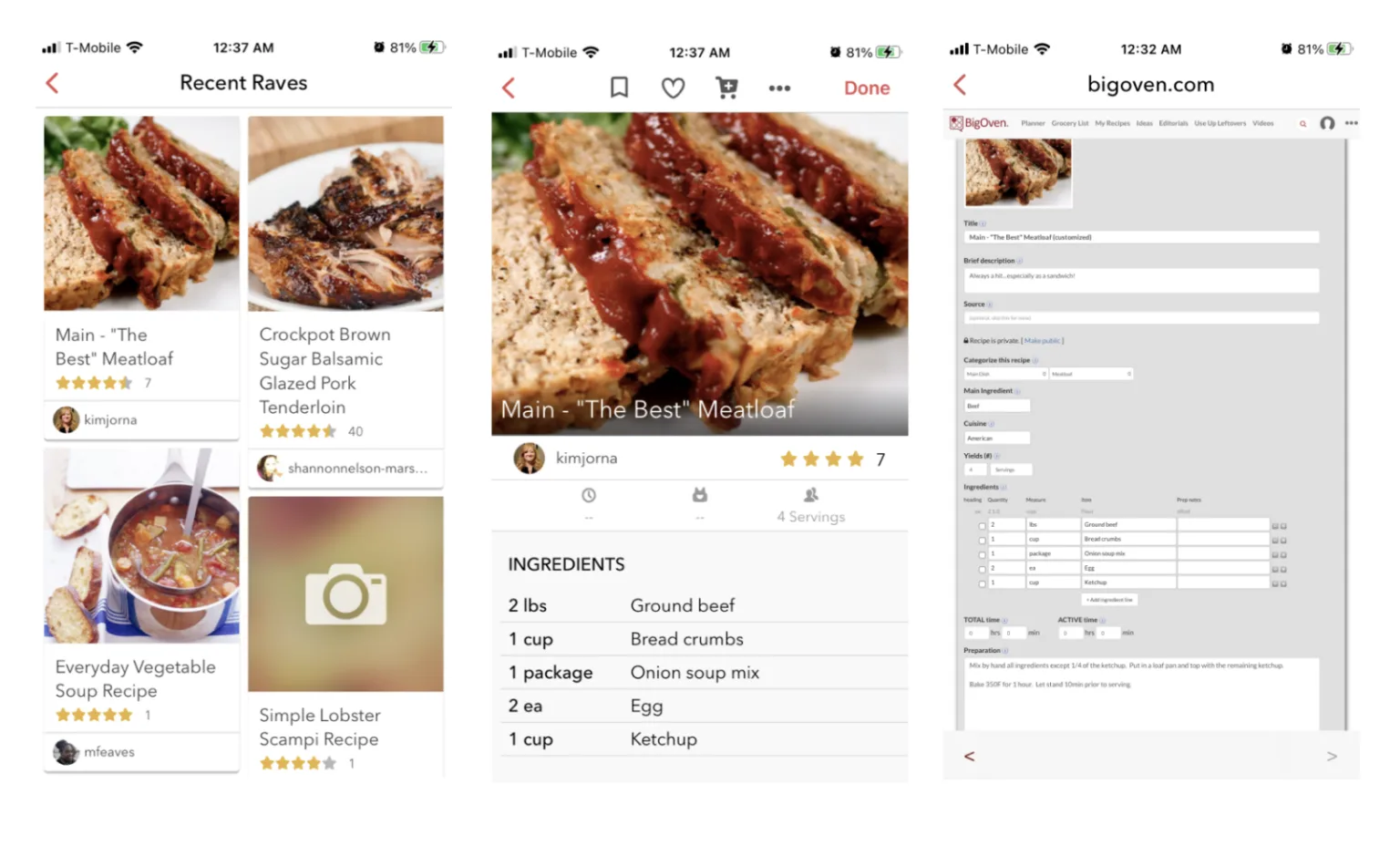
BigOven's main selling point is volume. Over one million recipes, all searchable and browsable. The free tier is reasonably generous — up to 200 saved recipes, basic grocery list support, and access to the full recipe database. Pro is $2.99/month or $24.99/year, which makes it one of the cheapest paid options on this list.
The meal planning calendar and grocery list generation are both available on Pro. Recipe scanning (upload a photo of a physical recipe) is included. The interface is functional but dated — it hasn't had a design refresh in a while and feels older than apps like Kitchendary or Mealime. AI features are minimal. But if you primarily want a searchable recipe library and a basic grocery list at the lowest possible price, BigOven delivers that.
One genuinely useful feature: the "use up leftovers" tool that suggests recipes based on ingredients you already have. It's a clever addition that most other apps in this comparison don't have.
AnyList: grocery lists done right
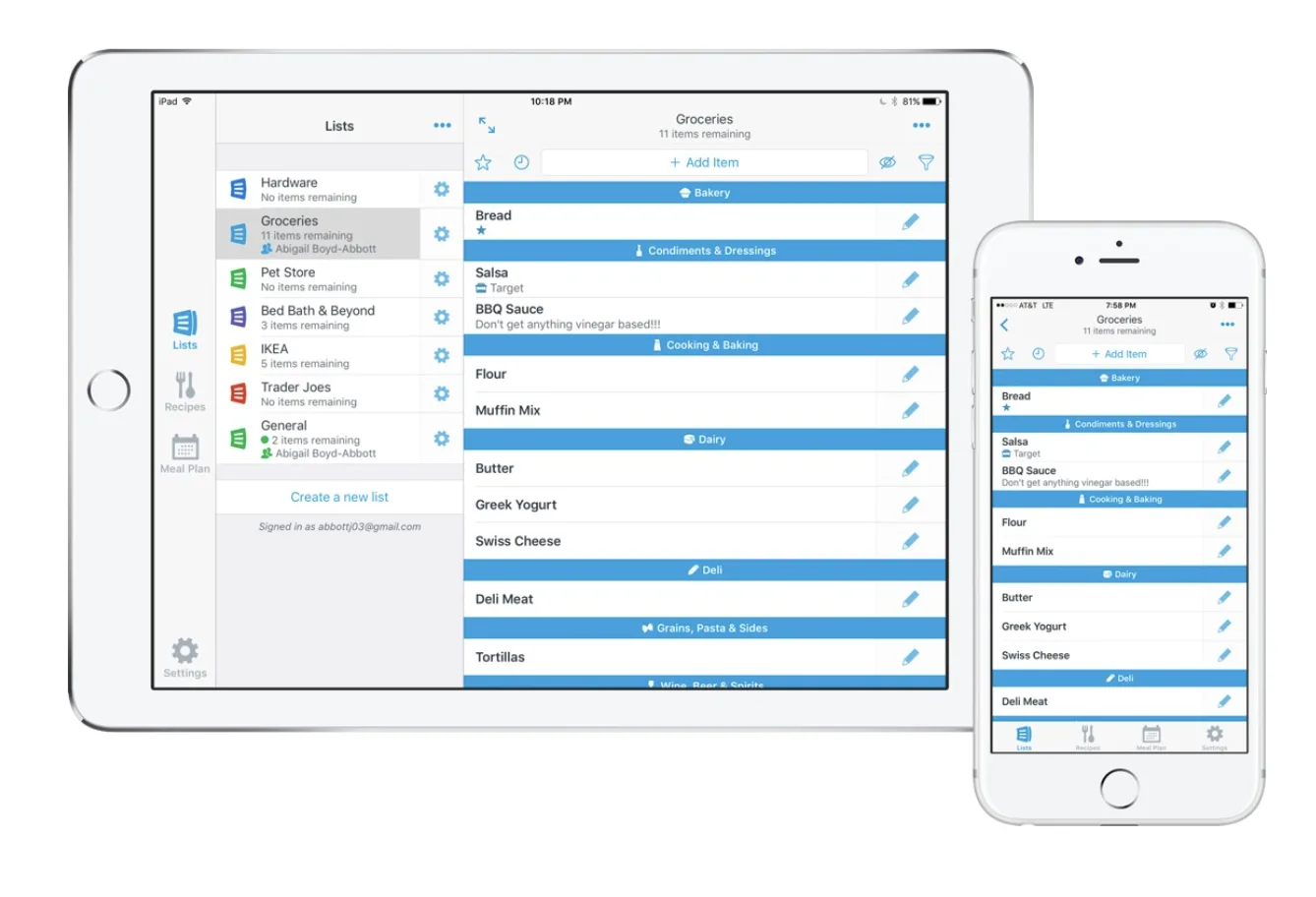
AnyList is what you get when a team focuses entirely on making grocery lists excellent and treats everything else as secondary. The list experience is fast, clean, and smart — items auto-categorize as you type, sharing with household members works seamlessly in real time, and Siri integration means you can add to your list with your voice while driving.
The recipe features exist but feel secondary. You can import recipes from URLs and add ingredients to your list with a tap, and there's a basic meal planning calendar. But recipe import is slower than Paprika, the calendar is minimal compared to Plan to Eat, and there are no AI features at all.
Pricing is the most interesting part: AnyList Complete is $9.99/year for individuals or $14.99/year for a household. That's less than a dollar a month. It covers the Mac app, browser extension, and all premium list features. If all you want is a great shared grocery list with basic recipe support, this is the best value in the market.
OurGroceries: the free option that's actually good
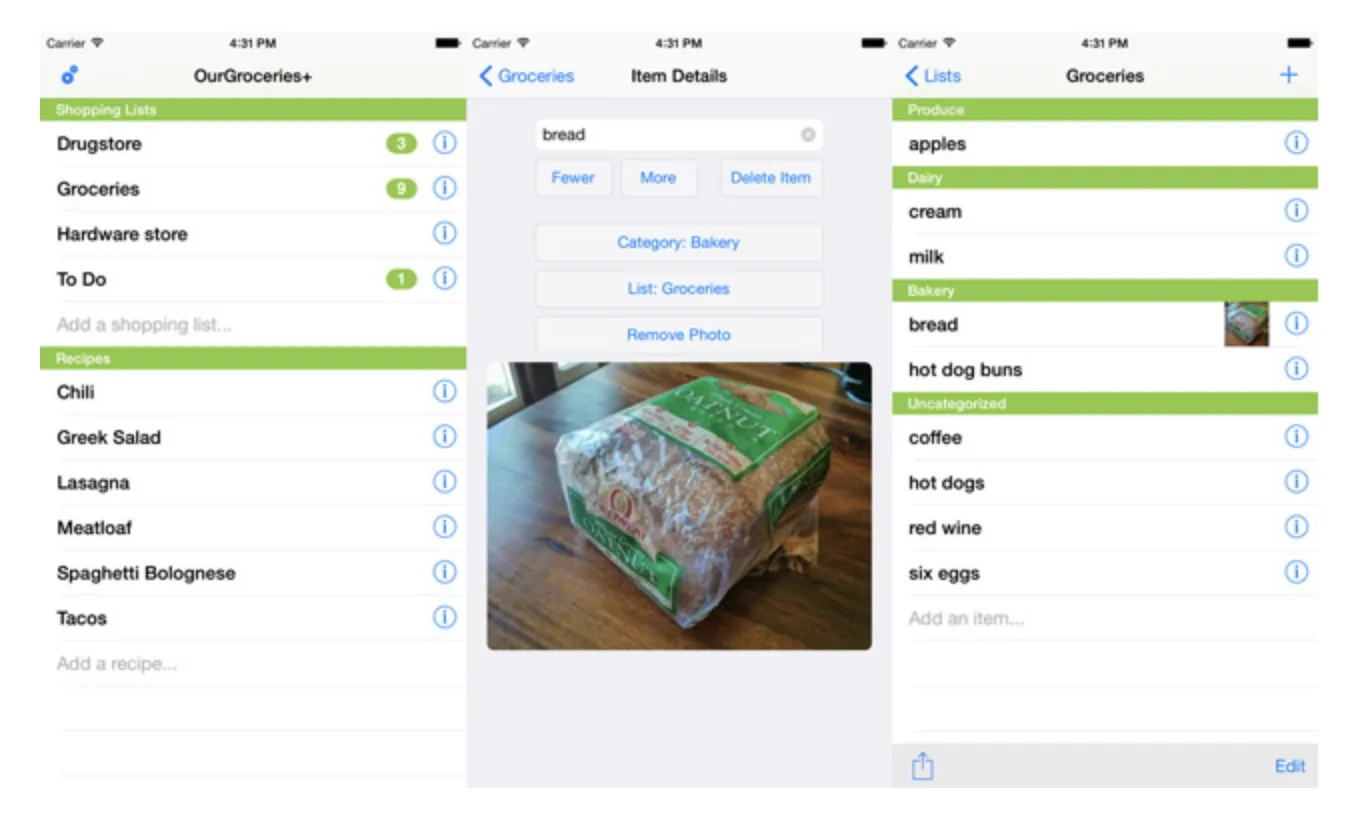
OurGroceries does one thing: shared grocery lists. It does that one thing reliably, for free, on iOS, Android, web, and Alexa. Multiple household members can share lists, items sync in real time, and the interface is simple enough that anyone in the family can figure it out in two minutes.
Recipe management exists in a limited form — you can store recipes and add their ingredients to your shopping list — but this isn't a meal planning app. There's no meal calendar, no AI, no nutrition tracking, and no recipe import from websites. It's a shared grocery list with basic recipe ingredient support, and that's it.
That's fine. Not every household needs a full meal planning app. If your main friction is coordinating the grocery list between two people, OurGroceries solves it for free. If you want the recipe-to-list workflow to be more automated, you'll need to step up to something like Kitchendary or Plan to Eat.
Samsung Food (formerly Whisk)
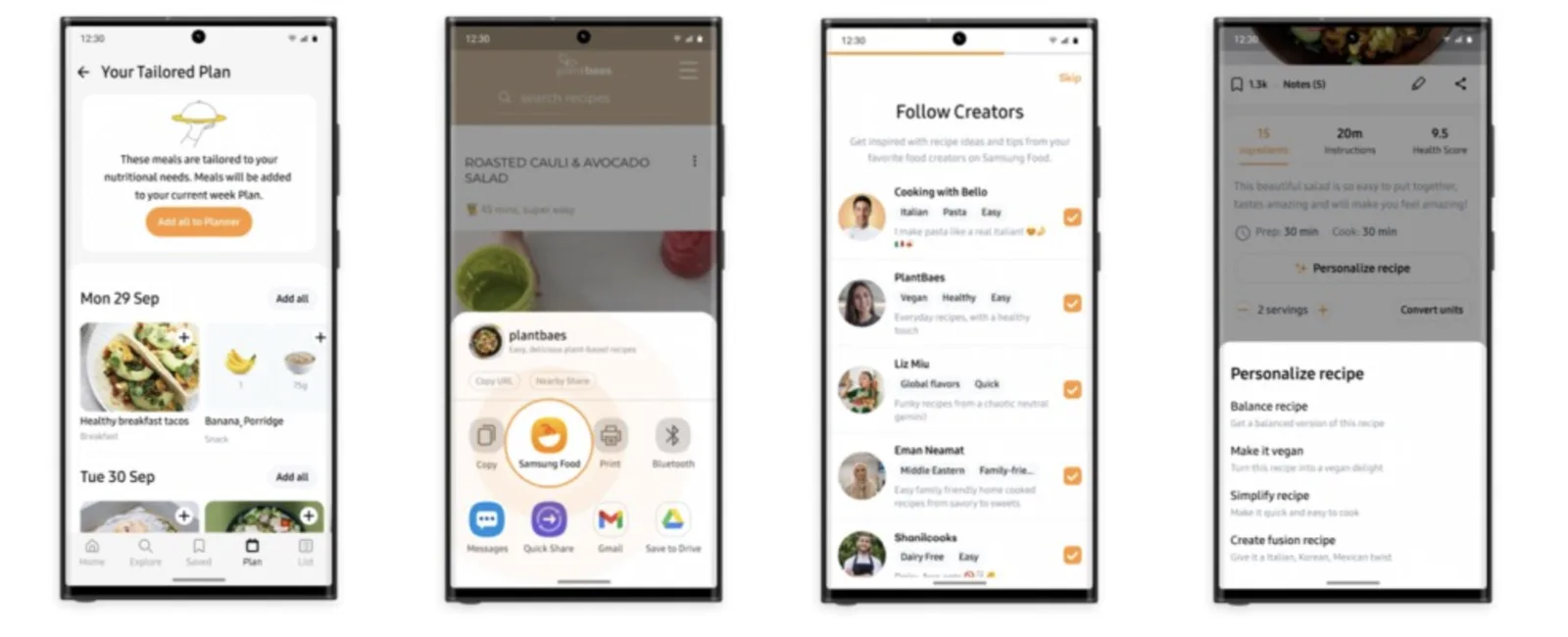
Samsung Food started as Whisk, a recipe-saving and meal planning app, and was acquired by Samsung in 2019. It's now deeply integrated into Samsung devices — particularly smart TVs and smart fridges — which is its primary differentiator. The core features are solid: recipe saving via URL, meal planning, and auto-generated grocery lists. It's free.
The Samsung ecosystem integration is the clearest reason to use it over competitors. If you have a Samsung Family Hub fridge, Samsung Food syncs directly to the fridge's screen. That's a genuinely useful feature that no other app on this list offers. For non-Samsung users, it's a decent free option but doesn't have obvious advantages over AnyList or OurGroceries for basic needs, or Kitchendary for users who want AI-driven planning.
The recipe-to-grocery-list workflow: what actually matters

When you're comparing these apps, four things actually matter for day-to-day use:
- Recipe import flexibility. Can it pull from the sites you actually use? Can it handle social media? Photos? The more sources it accepts, the less friction in building your recipe library.
- Grocery list intelligence. Does it merge duplicate ingredients across recipes? Does it account for pantry inventory? Does it organize by store section? A list that makes you reorganize items yourself defeats the purpose.
- Planning effort required. Manual drag-and-drop is fine for people who enjoy planning. AI-generated plans are better for people who just want to eat well without thinking about it. Know which camp you're in.
- Collaboration support. Solo cooks need nothing here. Households with multiple shoppers or cooks need real-time list sync at minimum, and ideally shared calendar access and task assignment.
Most apps in this comparison do the first two things acceptably. The differentiation comes on the last two — and that's where Kitchendary's AI planning and real-time collaboration features create the clearest gap.
A practical example: planning a week with Kitchendary

Here's what a typical week looks like in Kitchendary to make it concrete:
- Monday morning, 5 minutes. Open Kitchendary, tap "Generate meal plan." Set parameters: 4 people, Mediterranean preference, one vegetarian day, avoiding shellfish. AI builds a 7-day plan with breakfast, lunch, and dinner. Review, swap out anything you don't want (takes another minute), confirm.
- Grocery list is already done. Kitchendary pulls all ingredients from all 21 meals, merges duplicates (you're not buying 3 separate quantities of olive oil), and organizes by produce / proteins / dairy / pantry staples. Takes 30 seconds to scan and add any extras you want.
- Share with your household. Your partner can see the plan, add to the grocery list while at the store, and check items off in real time. You don't need to call each other to confirm whether someone already bought the chicken.
- During the week. Any recipe you want to save from Instagram or a cooking website goes straight into Kitchendary. It's available for next week's planning, or you can drop it into this week's plan immediately.
- Friday. Check what didn't get cooked, adjust next week's plan based on what's still in the fridge. Kitchendary's pantry tracking helps you not throw away food.
Compare that to the workflow in a manual app like Plan to Eat or Paprika: you'd spend 20-30 minutes finding and dragging recipes into the calendar, then another 10 minutes building the grocery list. The end result is similar, but the time investment is very different.
For new meal planners, the meal prep for beginners guide covers the broader habits around cooking ahead of time that make any meal planning app more effective.
Which app should you actually use?
The honest answer depends on what you actually need:
- You want AI to handle the planning and just need to shop and cook: Kitchendary. Nothing else in this list generates full 7-day plans with a smart grocery list in 60 seconds.
- You have a large existing recipe collection and want it beautifully organized: Paprika. The best pure recipe manager if organization is your primary goal.
- You want fast weeknight dinners with minimal decision-making: Mealime. Closed library, but the speed and 30-minute recipes are genuinely useful.
- You're a serious meal planner who enjoys the planning process: Plan to Eat. Solid drag-and-drop calendar and reliable grocery list generation.
- You're on a tight budget and mainly want a recipe database: BigOven at $2.99/month. Over a million recipes and a functional Pro tier.
- You mainly want a shared grocery list and don't need meal planning: AnyList at $9.99/year, or OurGroceries for free.
- You're deep in the Samsung ecosystem: Samsung Food, especially if you have a Family Hub device.
If you're unsure which app fits, check the broader best meal planning apps comparison or the healthy meal planning guide for more context on building a routine that actually sticks.

FAQ
Is there an app that automatically creates a grocery list from recipes?
Yes — several apps do this, including Kitchendary, Paprika, Plan to Eat, and BigOven. Kitchendary is the most automated: once you build or generate a meal plan, it instantly consolidates all ingredients into an organized shopping list, sorted by category, with duplicates merged. No manual copying required.
What is the best free recipe-to-grocery-list app?
For a completely free experience, OurGroceries (grocery lists with recipe integration) and Mealime (meal planning with auto grocery lists) are solid picks. Kitchendary offers a free trial so you can test the AI meal planning and grocery list features before committing. BigOven's free tier covers up to 200 saved recipes with basic grocery list support.
How does Kitchendary compare to Paprika Recipe Manager?
Paprika is excellent at organizing recipes you've already collected — great web clipper, solid pantry management, and one-time purchase pricing. Kitchendary goes further: it generates meal plans with AI, imports recipes from social media and photos (not just websites), and adds real-time family collaboration. Paprika also charges per platform (separate purchases for iOS, Mac, Android), which adds up. Kitchendary is subscription-based but covers all platforms.
Can meal planning apps actually save money on groceries?
Yes, in two ways: reducing impulse buys (you shop with a complete list) and cutting food waste (you only buy what you'll actually cook). A 2023 USDA study found that households using structured meal plans wasted 25-30% less food. Kitchendary's consolidated grocery list merges duplicate ingredients across recipes, so you're not accidentally buying two bags of flour for two different meals.
What is the 5 4 3 2 1 grocery rule?
It's a simple weekly shopping framework: 5 fruits and vegetables, 4 proteins, 3 grains, 2 dairy items, and 1 treat. It's not a rigid diet — more of a mental checklist that keeps your cart balanced without over-complicating things. Apps like Kitchendary let you filter meal plans by nutritional goals, which naturally aligns your weekly plan with a structure like this.
Does Plan to Eat have a free version?
Plan to Eat offers a free trial (typically 30 days) but no permanent free tier. After the trial it's a paid subscription — pricing is around $6.25/month billed annually. It's a well-regarded app for families who already have an existing recipe collection they want to organize, with solid drag-and-drop meal planning.
Which meal planning app is best for families?
For families, the key features are real-time list sharing, multiple user support, and the ability to assign meals to different household members. Kitchendary's collaboration tools let you share plans, assign cooking tasks, and sync grocery lists in real time. OurGroceries is free and great for list-sharing specifically. Cozi is popular for family calendars but is weaker on the recipe side.
Can I import recipes from Instagram or TikTok into a meal planning app?
Most apps only support URL-based recipe import from traditional cooking websites. Kitchendary's universal recipe parser can pull recipes from social media posts, photos you take with your phone camera, and screenshots — which makes it uniquely useful for saving recipes you find while scrolling.
Is there a free app to organize my recipes?
Paprika's mobile app has a one-time purchase fee (around $4.99 on iOS). BigOven's free tier stores up to 200 recipes. Kitchendary offers a free trial with full recipe organization features. If you want something truly free with no limits, OurGroceries handles basic recipe-to-list functionality at no cost.