If you’ve ever opened the fridge at 7 p.m. and sighed, you’re not alone. Dinner decisions drain energy, especially when you’re juggling work, family, or just trying to eat better. Kitchendary exists to take that weight off your shoulders - turning meal planning into something you look forward to, not something you dread.

Why Meal Planning Feels So Hard - and Why It Doesn’t Have to Be
Most people don’t fail at meal planning because they lack discipline. They fail because traditional tools make it a chore. You jump between Pinterest, TikTok, recipe sites, and your notes app trying to piece together a plan. You type grocery items manually, estimate portions, and still forget something at the store. Then you repeat the cycle next week.
Kitchendary fixes that by giving you one smooth flow - from discovering new meals to actually cooking them. It brings together the full cooking loop: Recipe idea ➜ Meal plan ➜ Grocery list ➜ Cooking instructions.
Turn “Random Food Generator” Chaos Into Organized Fun
We all love discovering new dishes, but hopping between a random food generator site and your grocery list app quickly gets messy. Kitchendary keeps the fun while eliminating the friction. The built-in AI helper works like your own personalized random foods generator - suggesting ideas from a line you type — what you feel like, what’s in the fridge, or the diet you follow.
Whether you’re craving comfort food on a rainy night or something high-protein after a workout, you’ll never run out of inspiration. You can even ask for “random food” ideas for couples, families, or busy weeks when time’s short.
Import Recipes Straight From TikTok or Instagram
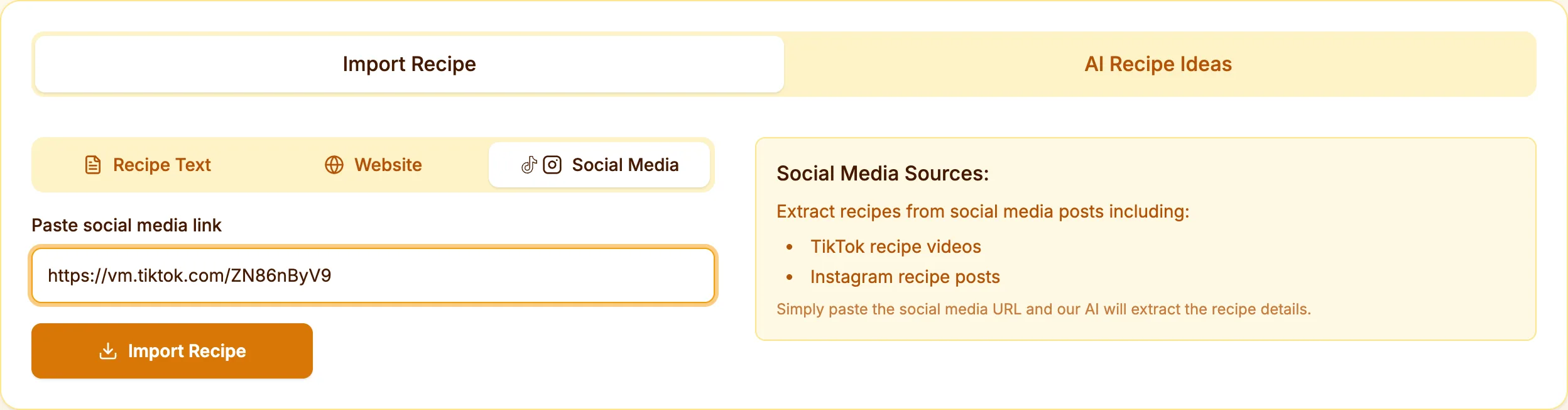
Scrolling through cooking videos has become a nightly ritual for millions. But saving and re-creating those recipes is usually painful - screenshots, notes, guessing ingredients. Kitchendary lets you paste the TikTok or Instagram link and automatically extracts the recipe with ingredients, steps, and timing.
Now every viral pasta, salad, or dessert you see can live neatly inside your personal recipe library. No typing, no guessing - just tap and cook.
Collaborate on Meals - Because Cooking Is Better Together
Kitchendary turns meal planning into something you can do together. Whether it’s with your partner, your kids, or roommates, everyone can vote on dishes, add cravings, or mark favorites. The shared calendar keeps everyone in sync, so you both know what’s planned for dinner before the day even begins.
Cooking together isn’t just about food - it’s about connection. Planning a week of meals with someone you love becomes a little ritual that brings you closer.
Your Smart Grocery List - Created Automatically
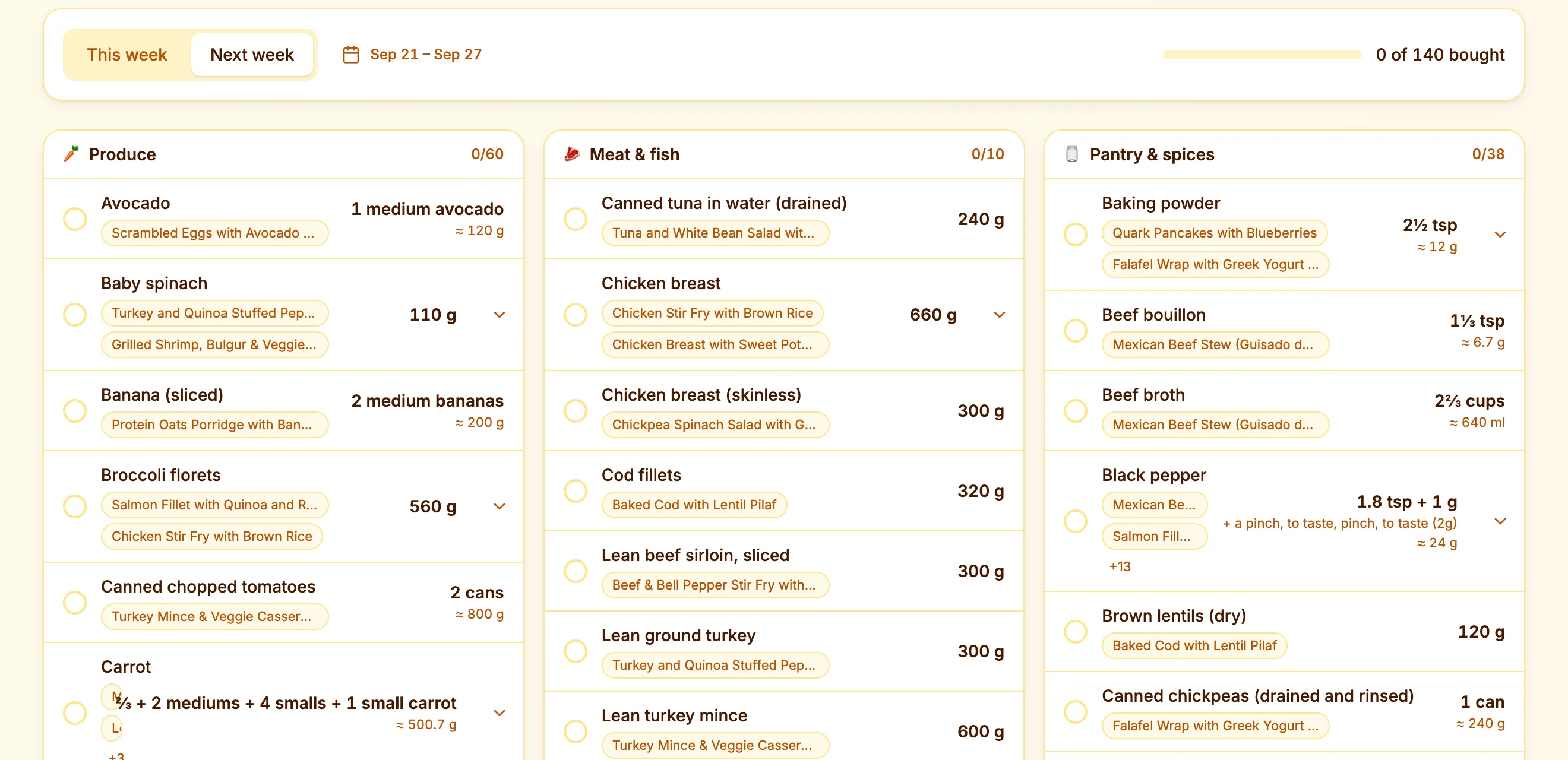
No more typing. No more guessing. Every time you add a meal to your plan, Kitchendary generates a grocery shopping list instantly. It groups ingredients by aisle - produce, meat and fish, dairy, pantry - and adds up quantities across recipes, scaled to the servings you planned.
Whether you prefer to create a grocery list from scratch or let the AI do it for you, it’s fast, clean, and accurate. You can treat it as your personal grocery list maker, grocery list creator, or even a complete shopping list creator that fits your routine perfectly.
From Idea to Dinner - The Complete Cooking Flow
Kitchendary brings all parts of cooking into one place. Here’s how a typical week looks when you use it:
- Discover ideas with AI or import recipes directly from social media.
- Add them to your meal plan calendar for the week.
- Let the app auto-generate your grocery list.
- Open the cooking instructions on your phone or tablet when it’s time to cook.
That’s it - no spreadsheets, no guesswork, no duplicated effort.
Save and Organize All Your Favorite Recipes
Your best meals shouldn’t vanish into screenshots or browser bookmarks. Kitchendary keeps every recipe you love in one searchable library. Filter by cuisine, prep time, or dietary tag - or ask AI to pull up something that matches your cravings right now.
It’s your personal “cookbook cloud,” available anytime. Whether you need something fancy for a date night or quick after a long day, you’ll find it in seconds.
Meal Planning That Adapts to You
Unlike traditional tools, Kitchendary learns from your habits. If you skip breakfasts or eat vegetarian on weekdays, the planner adjusts. If you add the same dish often, it’ll appear near the top of suggestions.
You can also tell it your goals - like staying under a calorie target or eating more protein - and it’ll tailor the week accordingly. Think of it as your personal food generator that doesn’t just give random ideas but smart, contextual suggestions.
AI That Understands Your Mood and Cravings
Some days you crave comfort; others, freshness. Kitchendary’s AI helper understands this balance. It suggests dishes that match your current vibe - spicy, cozy, light, indulgent - and builds plans around them.
The result? You spend less time thinking and more time enjoying meals that truly hit the spot.
Grocery Shopping Made Human Again
The smart grocery list doesn’t just save time - it saves arguments. No more “Did you buy the onions?” moments. Shared lists sync in real time, so everyone knows what’s needed. Add or check off items as you shop together or separately.
And because the list is auto-generated from your meals, you’ll never forget an ingredient again.
How Kitchendary Fits Into Real Life
Kitchendary isn’t only for food enthusiasts. It’s built for real people:
- Couples: Plan together, cook together, and avoid takeout fatigue.
- Families: Keep everyone’s favorites in one place and make grocery trips smoother.
- Singles: Batch-plan smart meals and cut food waste dramatically.
- Busy professionals: Automate grocery lists and save hours each week.
From Scrolling to Serving - How It All Comes Together
Imagine this: it’s Sunday morning. You open TikTok, spot a creamy ramen recipe, and tap “Save to Kitchendary.” Within seconds, it appears in your weekly plan. The app generates your grocery list, syncs with your partner’s phone, and by afternoon you’re both cooking - laughing, tasting, adjusting spice levels, and actually enjoying the process.
That’s what Kitchendary is built for - to bring joy back into everyday meals.

Why Users Love It
People who try Kitchendary often say the same thing: it’s like having a calm version of yourself handling all the food chaos. No more last-minute stress, forgotten ingredients, or endless scrolling for “something to cook tonight.”
The simplicity is what hooks them, but the magic is in the flow - how every part of cooking connects seamlessly. That connection is what turns a chore into something almost therapeutic.
Ready to Make Meal Planning Effortless?
Kitchendary isn’t just an app - it’s a lifestyle shift. One where you stop wasting time deciding what to cook, and start spending it actually cooking, eating, and living.
Plan your week so you never have to ask “What’s for dinner?” again. Let the AI handle the thinking, and focus on the fun parts - flavor, company, and creativity.
Start Your First Week Today
Download Kitchendary, create your first plan, and experience how smooth meal planning can be. You’ll discover new recipes, build smarter grocery lists, and finally make dinner time something everyone looks forward to.
Kitchendary - where good food meets good planning.
Manual Planning vs Kitchendary - A Honest Look
If you're on the fence about switching from your current system, this table should settle it pretty quickly.
| Task | Manual Planning | Kitchendary |
|---|---|---|
| Finding recipe ideas | Browse Pinterest, TikTok, Google - separately | AI suggestions + import from any link |
| Building a grocery list | Type ingredients manually, per recipe | Auto-generated the moment you add a meal |
| Adjusting for servings | Math. Manual multiplication per ingredient | Change servings - list updates instantly |
| Sharing the plan | Screenshot, text message, or repeat conversation | Shared calendar - everyone sees it live |
| Tracking nutrition | Copy ingredients into a separate calorie app | Macros tracked automatically per meal |
| Reducing food waste | Guess and hope for the best | Portions planned ahead - buy only what you need |
| Time spent per week | 2-3 hours minimum | Under 20 minutes |
How the Grocery List Handles Scaling Servings
This is one of those features that sounds small until it saves you from buying three times more pasta than you need.
When you add a recipe to your plan, Kitchendary asks how many servings you're cooking. Change that number - say, from 2 to 5 for a family dinner - and every ingredient in your grocery list scales accordingly. 200g of chicken becomes 500g. One lemon becomes three. The app does the math so you don't have to.
It works the other way too. Cooking for one? Drop servings to one and you won't end up with a half-used bunch of herbs going brown at the back of your fridge. That kind of precision adds up across a full week of meals.
A few things worth knowing about how it works:
- Ingredients across multiple recipes using the same item get combined. Two recipes both calling for garlic? One entry on your list with the total amount.
- You can manually override any quantity if your recipe is slightly different from the saved version.
- The list groups by category - produce, dairy, pantry staples - so your grocery run follows a logical path through the store.
Weekly Planning Is the Easiest Way to Cut Food Waste
The average household throws out roughly 30% of the food it buys. Most of it isn't because people are careless - it's because they shop without a clear plan and end up with ingredients that don't connect to actual meals.
Planning your week in advance changes this almost immediately. When you know Monday is salmon, Tuesday is stir-fry, and Wednesday uses up the leftover rice, you buy with purpose. Nothing sits in the fridge waiting for a recipe that never comes.
Kitchendary makes this practical rather than aspirational. Because your grocery list comes directly from your meal plan, you only buy what you've committed to cooking. No more "I'll use this spinach for something" - you already know what it's for.
A few habits that compound the effect:
- Schedule at least one "use it up" meal on Fridays - a stir-fry, frittata, or grain bowl built from whatever's left.
- Plan meals with overlapping ingredients. If one recipe calls for half a can of coconut milk, plan another that uses the rest.
- Check your pantry before generating the list - Kitchendary lets you mark items you already have so they don't appear on the shopping list.
Building a Pantry-Based Meal Rotation
Here's a strategy that genuinely changes how much time and money you spend on food. Instead of planning meals from scratch every week, build a rotation of 15-20 meals that you already know how to cook and enjoy. Then each week you're just picking from that rotation - not reinventing the wheel.
Kitchendary's recipe library is built for exactly this. Save your go-to meals, tag them by effort level or cuisine, and pull them into your plan when the week calls for something familiar. Reserve AI suggestions or recipe imports for when you actually want something new.
A solid rotation also means a more predictable pantry. If you cook the same 15-20 meals in rotation, you know roughly what you always need in stock. Olive oil, canned tomatoes, rice, soy sauce - the list becomes muscle memory. Shopping gets faster because most of what you need is already at home.
To start your own rotation:
- Think back to the last month. What meals did you genuinely enjoy making? Write down 10.
- Add them to Kitchendary and tag them (e.g., "quick", "weekend", "batch cook").
- Each week, pick 4-5 from the rotation as your base. Fill the remaining slots with new ideas if you're feeling adventurous.
- Over time, the rotation naturally evolves - bad meals get dropped, good ones stay, and you discover what you actually want to eat regularly.
It sounds simple because it is. The people who eat well consistently aren't constantly discovering new recipes - they have a reliable core and expand from there.
FAQ
How does Kitchendary generate a grocery list automatically?
When you add recipes to your weekly meal plan, Kitchendary reads all the ingredients across every meal, combines duplicates, adjusts quantities based on your serving count, and outputs a single organized list grouped by store category. You don't type anything manually.
Can I import recipes from TikTok or Instagram?
Yes. Paste the video or post URL into Kitchendary and it extracts the recipe — ingredients, steps, and timing — automatically. This works for TikTok, Instagram, YouTube, and most recipe websites.
Does the grocery list update if I change the number of servings?
Yes. If you increase or decrease the servings for a meal, all ingredient quantities in the grocery list update automatically. If the same ingredient appears in multiple recipes that week, it gets combined into one line item.
Can I share the grocery list with someone else?
Yes. The grocery list syncs in real time across all household members. Anyone on the shared plan can add items, check things off, or update quantities while shopping.
Is Kitchendary free to use?
Kitchendary offers a free trial so you can test the full feature set — recipe import, meal planning, and grocery list generation — before subscribing.
How is Kitchendary different from a regular grocery list app?
A standard grocery list app just stores items you type in. Kitchendary generates the list from your meal plan, so the ingredients always match exactly what you are cooking that week. It also combines ingredients across recipes, adjusts for servings, and organizes by store section automatically.